Skip the story

EVIDENCE COLLECTION. WITHOUT THE LOGISTICS.

Their phone.
Their location.
We handle the rest.

Request, track, and receive your remote collections through MARA.

Request, track, and receive full or targeted collections in one portal.

Full or targeted. Self-guided or MARA-assisted.

Your firm’s collection workspace.MARA product interface

01 / REQUEST

Start with the matter.
Set the scope.

Enter the custodian’s details and choose a full or targeted collection. Submit the request directly from your portal.

Add the custodian. Choose the scope. MARA takes it from there.

Collect only what the matter needs.

Choose a full collection or target calls, messages, contacts, or a selected combination.

One request. A clearly defined scope.MARA product interface

02 / COORDINATE

Your custodians
can be anywhere.

MARA coordinates directly with them and guides the collection. One phone or custodians across several matters.

MARA coordinates every custodian, wherever they are.

iPhone: a Windows PC or Mac. Android: directly on the phone.

Example custodian locations across the United States.MARA workflow

02 / THE IPHONE WORKFLOW

Their phone.
Unlocked and ready.

For an iPhone collection, the custodian unlocks their phone. MARA guides the next steps on their Windows PC or Mac.

For iPhone, unlock the phone. MARA guides the next steps.

Their phone stays with them.

The iPhone workflow, wherever the custodian is.MARA workflow

02 / DOWNLOAD MARA

Open the invitation.
Download MARA.

The iPhone custodian follows their invitation link and downloads the MARA app to their Windows PC or Mac.

For iPhone, use the invitation to download MARA on Windows or Mac.

A clear next step, with help available when needed.

Download the app from their private collection page.MARA workflow

02 / CONNECT THE IPHONE

Connect by cable.
Ready to collect.

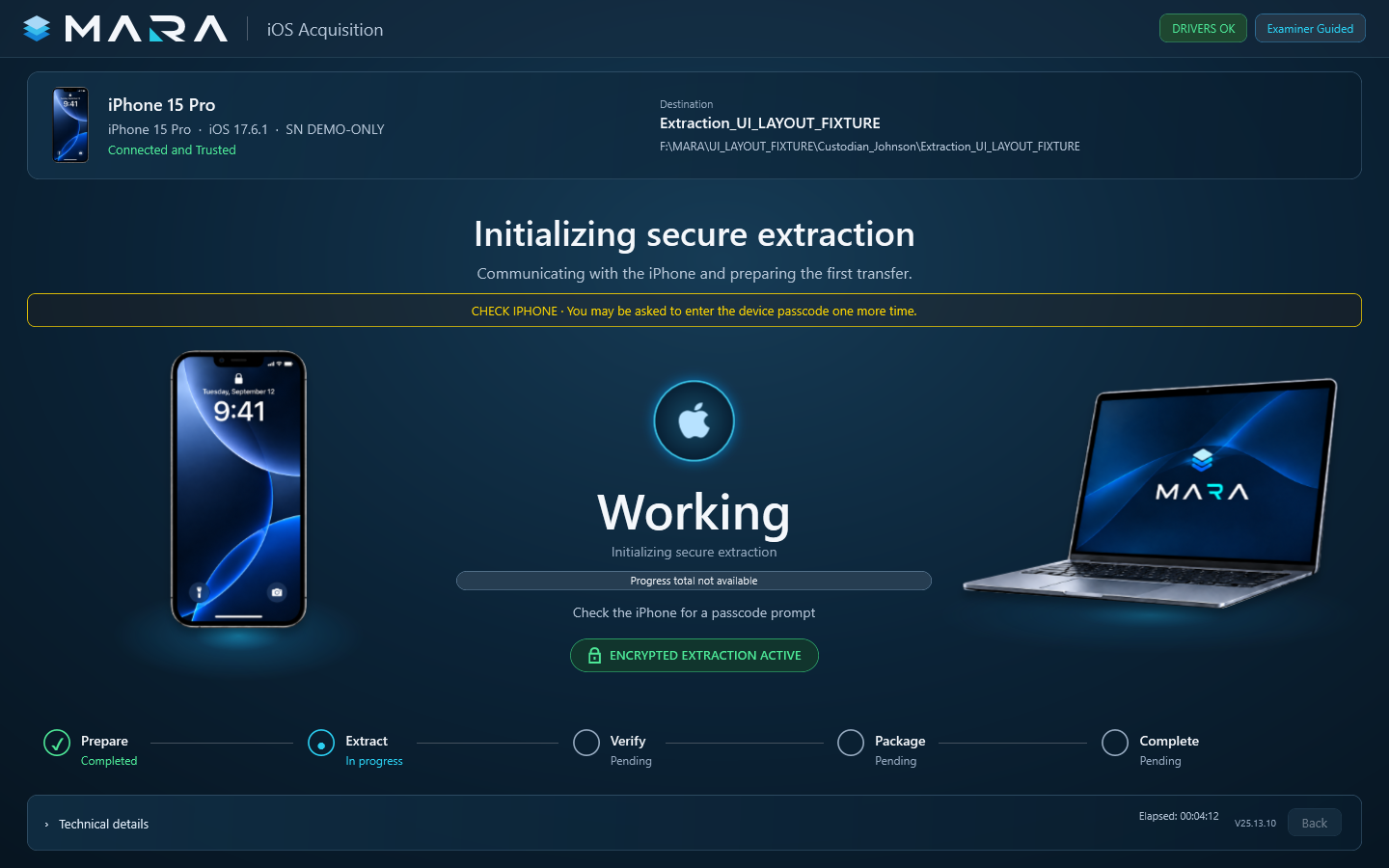
They open MARA and connect their unlocked iPhone to the computer with a USB cable. The app guides any prompts before collection begins.

Connect the unlocked iPhone to the computer with a USB cable.

Their iPhone. Their computer. One guided workflow.

Connect the iPhone. Follow the prompts. MARA guides the rest.MARA workflow

02 / THE RIGHT SUPPORT

Easy to follow.
Support when needed.

The MARA app walks iPhone custodians through the collection. They can complete it independently or work with MARA through a guided session.

Start the collection. Follow the steps, with MARA help when needed.

We coordinate either way.

Self-guided or MARA-assisted. The same simple iPhone collection app.MARA product interface

03 / SECURE UPLOAD

From their computer.
To your secure portal.

After the iPhone collection, MARA automatically uploads the files securely to your portal. Follow the transfer as it happens, then receive the verified collection.

The completed iPhone collection uploads automatically to your secure portal.

Collected. Uploaded automatically. Delivered to your workspace.

The iPhone collection uploads automatically from the custodian’s computer to your portal.MARA product interface

03 / TRACK

Stay informed.
Leave the logistics
to MARA.

See when the upload is received, verification is complete, and the collection is ready for your team.

Follow the collection from upload through verification.

One place to follow every collection.

Upload received → Verified → Ready to download.MARA product interface

04 / RECEIVE

Your collection.
Ready for your team.

Download the completed collection and its accompanying deliverables from the same portal where you started.

Download the collection and its deliverables in the same portal.

Remote collections, managed from start to finish.

Download your collection, with the option to include MARA Review.MARA product interface

04 / DOWNLOAD & REVIEW

Your collection.
Ready to review.

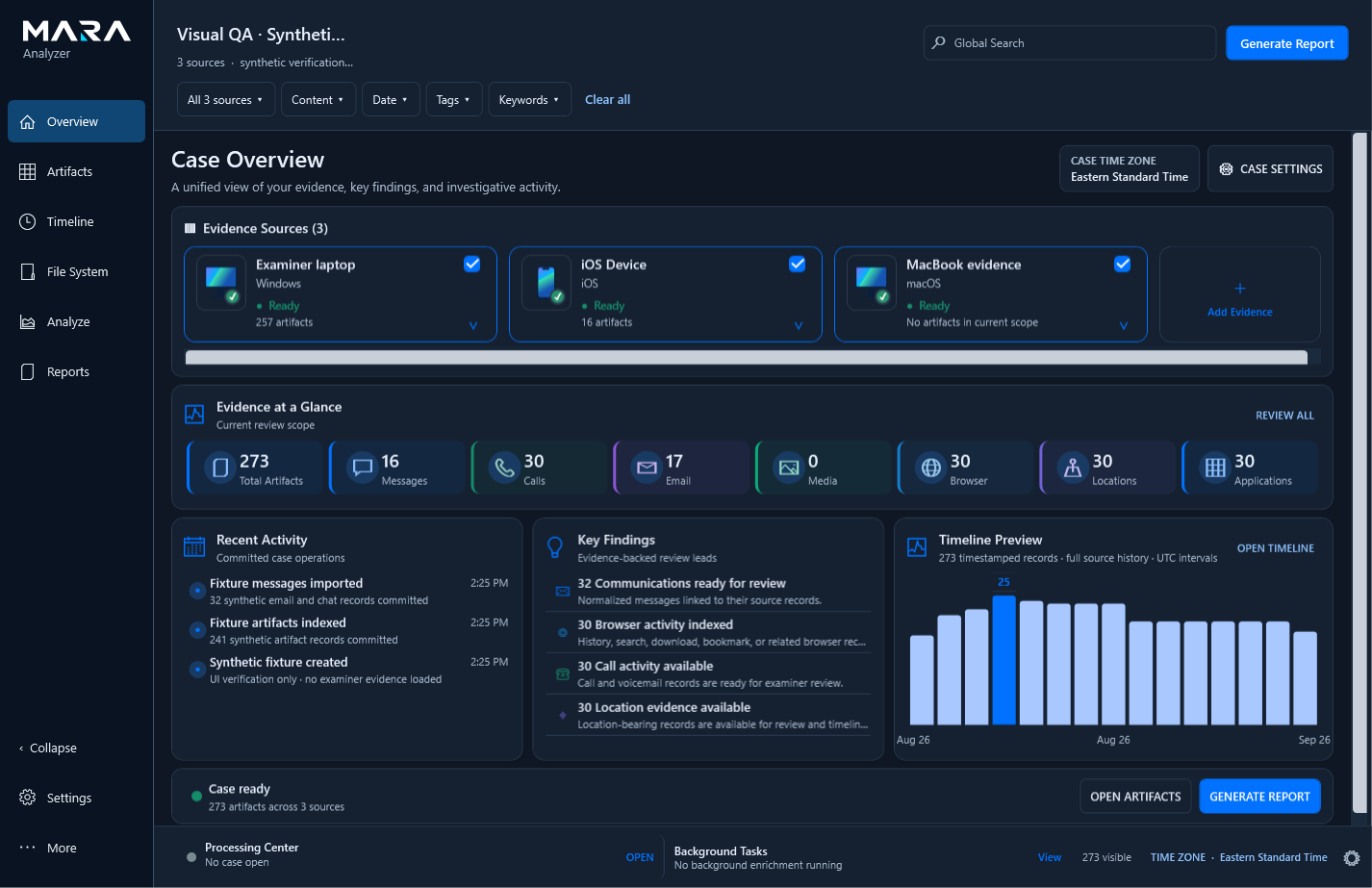
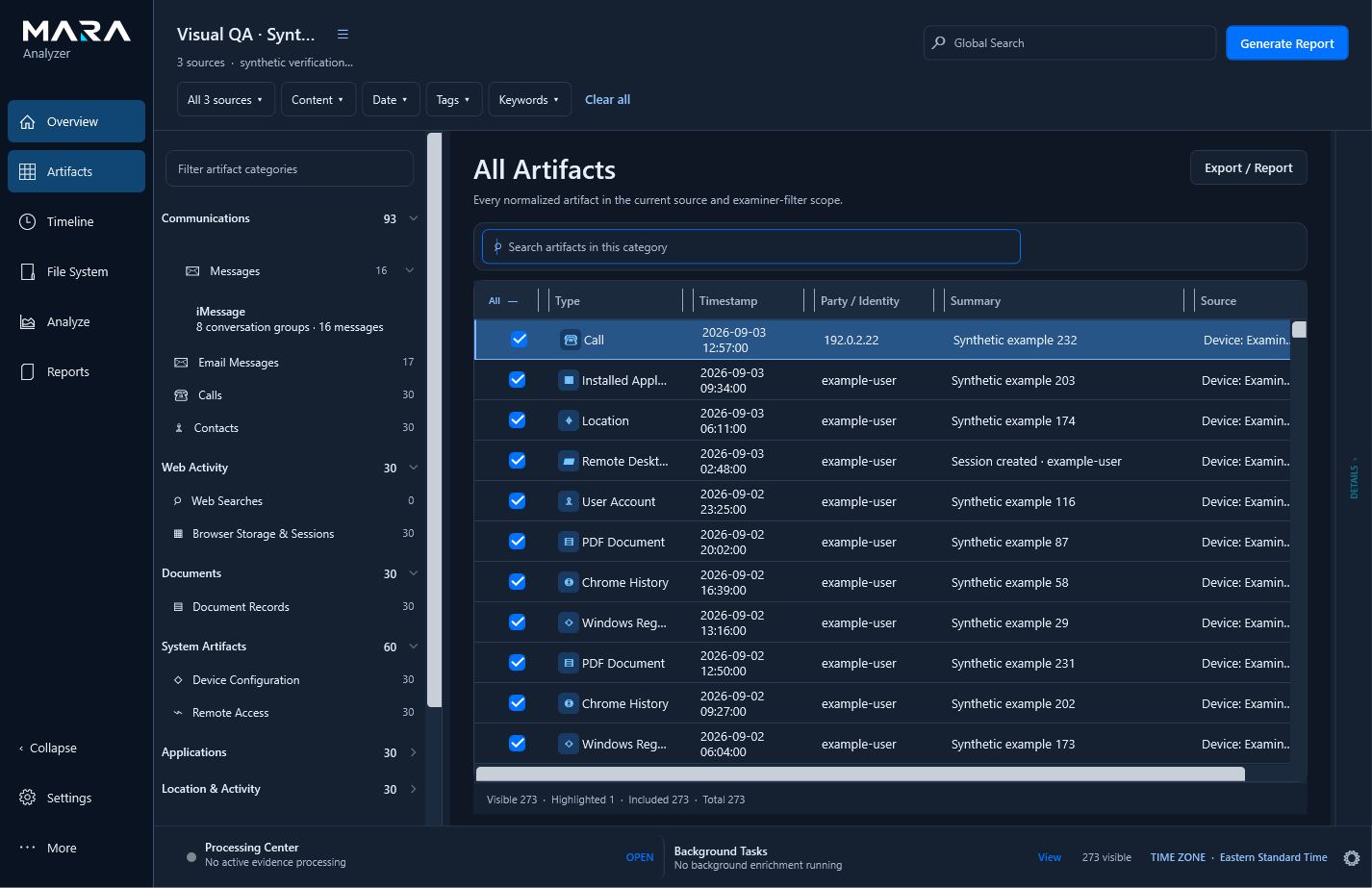
Open the delivered collection in MARA Analyzer. Explore the overview, review messages, and prepare selected records for export.

Review in MARA Analyzer. Select the records. Choose your export.

From the collection request to the records your team needs.

Overview → Artifacts → Messages → Create Export / Report.MARA product interface
SCROLL TO FOLLOW THE COLLECTION

ANDROID · DIRECTLY ON THE PHONE

Android collection.
No computer required.

A full supported Android collection, directly on the phone.

The MARA phone app collects text messages, WhatsApp, Signal, and other supported data without a computer connection. Upload the completed collection directly from the phone app to the portal.

Text messagesWhatsAppSignal
  1. Open MARA

    Open the app on the Android phone.

  2. Collect

    Follow the steps for the full supported collection.

  3. Complete

    The completed collection package is prepared.

Android also works with the MARA desktop app. MARA can help you choose the right setup.

Explore Android collection

The full supported collection is complete on the Android phone.

Illustrated Android workflow · Fictional collection. App opening, supported data collection, and a completed package.

REMOTE COLLECTION. LESS OVERHEAD.

Pay for the collection.
Skip the logistics.

No flights. No hotel stays. No shipping kits.

Custodians stay where they are. MARA coordinates the remote collection and support. iPhone collections use a Windows PC or Mac; Android collections run directly on the phone.

No travel expenses.No airfare or hotel stays to add to the collection budget.
No kits to ship or return.iPhone uses their computer and USB cable. Android needs no computer connection.
No travel coordination.MARA handles the collection workflow and custodian support. Your team stays focused on the matter.

NOT EVERY COLLECTION NEEDS THE SAME SCOPE.

Collect only what
the matter needs.

Not every matter calls for a full phone collection. Choose a full collection or target calls, messages, contacts, or a selected combination.

Supported message evidence includes SMS, iMessage, WhatsApp and Signal.

Follow a targeted collection

START WITH THE MATTER

A narrower question.
A considered scope.

Sometimes counsel needs phone evidence, but a full collection is broader than the matter calls for. Scope and privacy concerns belong in that first conversation.

A more focused option when the matter calls for something narrower.

MARAMANAGED COLLECTIONS
COUNSELMARA

Collection request

“My client is concerned about his privacy. Can we limit this collection to messages and calls?”
Scope and privacy, considered from the start.
A clear scope. A focused collection.

Built around what the matter needs.

Illustrated workflow · Fictional request and example scope.

AGREE IT BEFORE COLLECTION

One category.
Or a selected combination.

Choose calls, messages, contacts, or all three. In this example, calls and messages, including Signal evidence, are selected. Contacts stay outside the delivered scope.

Supported messages can include SMS, iMessage, WhatsApp and Signal evidence.

MARAMANAGED COLLECTIONS

Before the collection

Choose the collection scope.

Full collection
Targeted collection
CallsCall history
Selected
MessagesSMS · iMessage · WhatsApp · Signal
Selected
ContactsAddress book contacts
Not selected
Example scopeCalls + Messages
Illustrated workflow · Fictional request and example scope.

THE SAME GUIDED WORKFLOW

A familiar connection.
A defined scope.

MARA agrees the scope with your team before collection begins. The custodian connects the phone and follows our guidance, wherever they are.

This example uses an iPhone and Windows.

MARAMANAGED COLLECTIONS

Unlock the iPhone, connect it with USB, and confirm trust.

The agreed scope travels with the request.

Connect the iPhone. MARA guides the rest.

Illustrated collection workflow · iPhone + Windows

Illustrated workflow · Fictional request and example scope.

FOCUSED DELIVERY

The selected data.
The agreed scope.

MARA prepares calls and messages for this collection. Contacts remain unselected, keeping the delivered dataset focused on the requested categories.

Selected supported categories, with the supporting files needed for those artifacts.

MARAMANAGED COLLECTIONS

Targeted collection

Preparing the selected data.

Complete
CallsCall history
Complete
MessagesSMS · iMessage · WhatsApp · Signal
Complete
ContactsAddress book contacts
Not selected

Excluded from the delivered category sources.

Selected categories. Supporting sources. Documented scope.
Illustrated workflow · Fictional request and example scope.

READY FOR YOUR TEAM

Collected remotely.
Delivered to your team fast.

The targeted package brings together the selected evidence and collection documentation for your team’s review.

Available WhatsApp and Signal messages and associated media are included where supported.

Discuss a collection
MARAMANAGED COLLECTIONS

PREPARED EVIDENCE PACKAGE

Targeted Collection

MessagesSMS · iMessage · WhatsApp · Signal
Calls

Selected sources + review data + collection documentation

YOUR MARA PORTALReady to download
Illustrated workflow · Fictional request and example scope.

THE RIGHT SCOPE FOR THE MATTER

Two options.
The same guided approach.

MARA handles the technology and coordination. You decide the scope with us.

BROADER SCOPE

Full collection

For matters requiring the broader available phone collection.

Collect the broader supported device dataset when a full collection is appropriate for the matter.

Available content depends on the device and collection method.
SELECTED CATEGORIES

Targeted collection

Choose one or more supported categories when the requested scope is narrower.

  • Calls
  • Messages SMS · iMessage · WhatsApp · Signal
  • Contacts
Targeted collection: iPhone.
Focused collection. Same guided remote workflow.

Targeted collection limits the delivered dataset to the selected supported categories, with the supporting files needed for those artifacts. Available content depends on the device and collection method.
Need a full collection or a narrower scope?
Tell us what the matter requires.

Discuss a collection

WHATSAPP + SIGNAL · FROM THE PHONE

The world’s only remote collection platform for WhatsApp and Signal evidence from both iPhone and Android phones.

Collect messages and available attachments from the custodian’s phone, wherever they are.

Their phone stays with them. The completed collection is delivered securely to your MARA portal for review and export in MARA Analyzer.

WhatsAppSignal
Explore the collection capabilities
Illustrated product workflow · Fictional messages and collection. Collect from the phone, receive the package in your portal, then review conversations and export in MARA Analyzer.
ASTER & VALE WORKSPACE

COLLECTIONS

Your collection workspace

Clients, matters, and remote collections. In one place.
In progress3
Completed this term37
Credits available60

Recent collections

THIS TERM
Fictional collections for Aster & Vale
CustodianDeviceClient / MatterStatus
Jordan LeeWork iPhoneExample Client AMatter 1042✓ Verified
Sam RiveraAndroid phoneExample Client BMatter 1043Uploading
Taylor ChenWork iPhoneExample Client AMatter 1044Invitation sent

Annual collection allowance

100 credits

  • 37 used
  • 3 reserved
  • 60 available
Illustrative workspace · Fictional firmIntended Enterprise experience. Example credits are not an advertised package.

ALL THEY NEED

Simple for them.
Handled by MARA.

Their phone stays with them. MARA provides the collection app and support for the right workflow.

iPhone: a Windows PC or Mac and a USB cable. Android: the MARA desktop app or the phone app. The phone app requires no computer connection and supports direct upload to the portal.

See how the service works

WHAT YOU RECEIVE

Your evidence.
Delivered to your team.

Tell us who needs to review the data and how they plan to use it. We confirm the delivery format before collection and provide the agreed evidence package with collection documentation.

01

Collect

The agreed source and scope, collected with MARA’s guidance.

02

Deliver

The collection package and documentation, in the agreed supported format.

03

Review

A handoff for your legal, forensic, or discovery team. Further analysis is agreed separately.

Explore the collection and delivery service

BUILT INTO THE TRANSFER

Protected in transit.
Encrypted in storage.

MARA’s transfer system uses encrypted connections and private cloud storage. Uploaded evidence is encrypted at rest, with access restricted to authorized users.

  • Encrypted transfers
  • Encrypted at rest
  • Controlled access

LET’S TALK ABOUT YOUR NEXT STEP

A collection to coordinate?

One phone or custodians across several matters. Tell us what needs collecting and when.

Discuss a collection

Please keep confidential case information out of the initial inquiry.